9ce50e9560
|
||
|---|---|---|
| .. | ||
| examples | ||
| image | ||
| src | ||
| LICENSE | ||
| README.md | ||
| README_CN.MD | ||
| keywords.txt | ||
| library.properties | ||
README.md
🌟LILYGO T-0.99TFT🌟
English | 中文
Quick start:
- Install the current upstream Arduino IDE at the 1.8 level or later. The current version is at the Arduino website.
- Start Arduino and open Preferences window. In additional board manager add url: https://raw.githubusercontent.com/espressif/arduino-esp32/gh-pages/package_esp32_index.json .separating them with commas.
- Select Tools -> Board Management -> Search for ESP32 and install
- Select Tools -> Board ->
- Copy the folder in the 'lib' directory to '~Arduino/libraries'
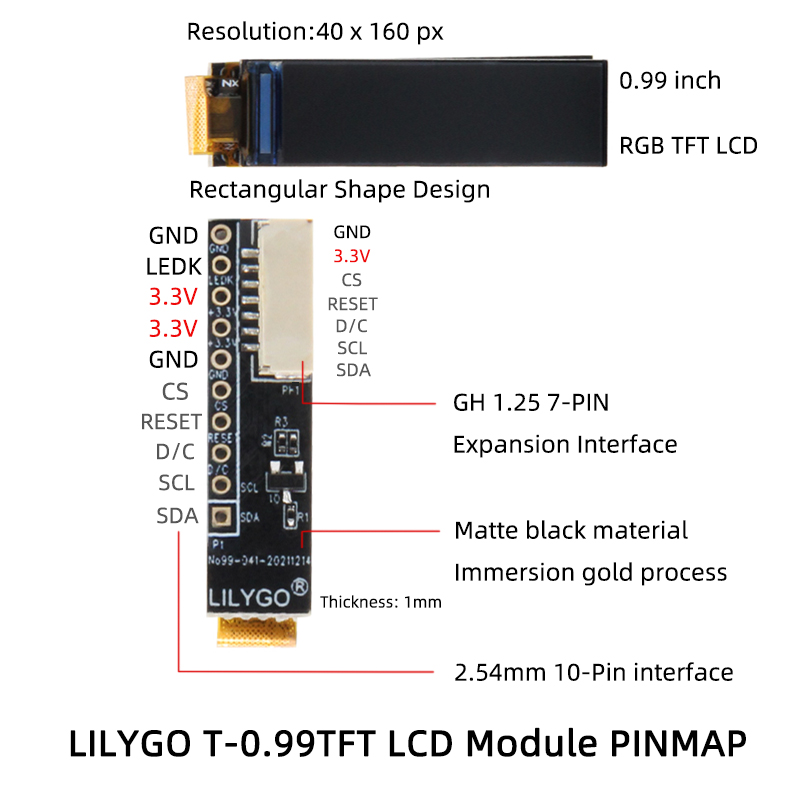
- Define pins and select display direction in TFT GC9D01N.h #define LANDSCAPE 1 //Horizontal screen //#define PORTRAIT 2
#define TFT_MISO -1 #define TFT_MOSI 10 #define TFT_SCLK 20 #define TFT_CS -1 #define TFT_DC 2 #define TFT_RST -1 #define TFT_BL 8
Product 📷:
| Product | Product Link |
|---|---|
| T-0.99TFT | AliExpress |
Pinout