T-keyboard/lib/T-0.99TFT
LilyGO fd7256d418 perfect: 2022-05-06 10:39:54 +08:00
..
3D_file perfect: 2022-05-06 10:39:54 +08:00
examples feature:T-keyboard 2022-03-31 11:19:14 +08:00
image perfect: 2022-05-06 10:39:54 +08:00
src perfect: 2022-05-06 10:39:54 +08:00
GC9D01N DataSheet V1.1.pdf perfect: 2022-05-06 10:39:54 +08:00
LICENSE feature:T-keyboard 2022-03-31 11:19:14 +08:00
README.md perfect: 2022-05-06 10:39:54 +08:00
README_CN.MD perfect: 2022-05-06 10:39:54 +08:00
keywords.txt feature:T-keyboard 2022-03-31 11:19:14 +08:00
library.properties feature:T-keyboard 2022-03-31 11:19:14 +08:00

README.md

🌟LILYGO T-0.99TFT🌟

English | 中文

Quick start:

  1. Install the current upstream Arduino IDE at the 1.8 level or later. The current version is at the Arduino website.
  2. Start Arduino and open Preferences window. In additional board manager add url: https://raw.githubusercontent.com/espressif/arduino-esp32/gh-pages/package_esp32_index.json .separating them with commas.
  3. Select Tools -> Board Management -> Search for ESP32 and install
  4. Select Tools -> Board ->
  5. Copy the folder in the 'lib' directory to '~Arduino/libraries'
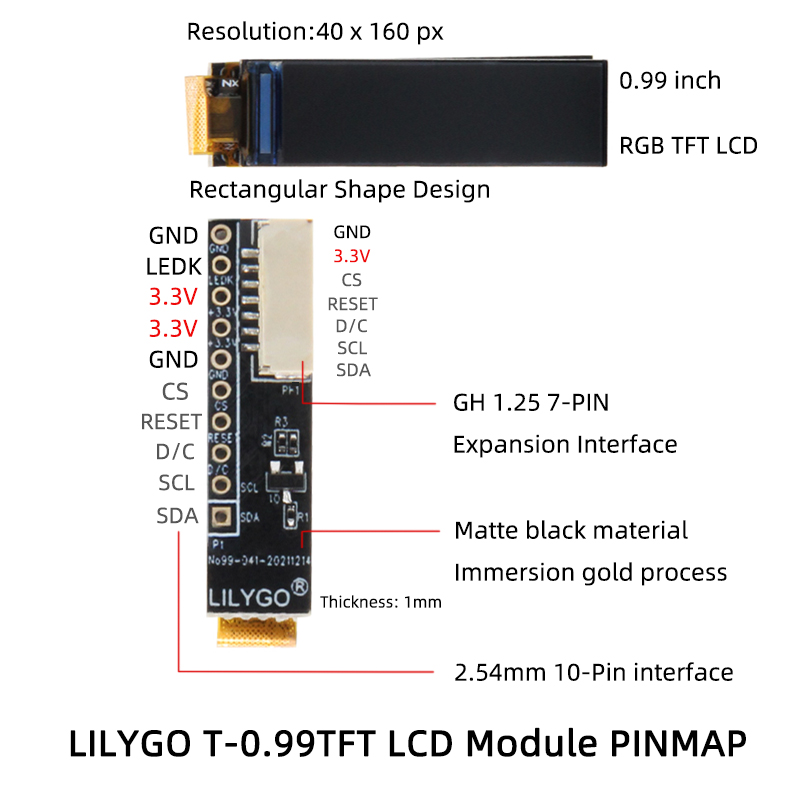
  6. Define pins and select display direction in TFT GC9D01N.h

default setting

PIN
TFT_MISO -1
TFT_MOSI 10
TFT_SCLK 20
TFT_CS -1
TFT_DC 2
TFT_RST -1
TFT_BL 8

Product 📷:

Product Product Link
T-0.99TFT AliExpress

Pinout